A restaurant website has one visitor with three questions: what do you serve, are you open right now, and how do I get it — a table, a pickup, a delivery. Everything on this checklist exists to answer those three questions faster than the marketplace apps do, and to keep the customer relationship (and the margin) with you instead of with a third party.
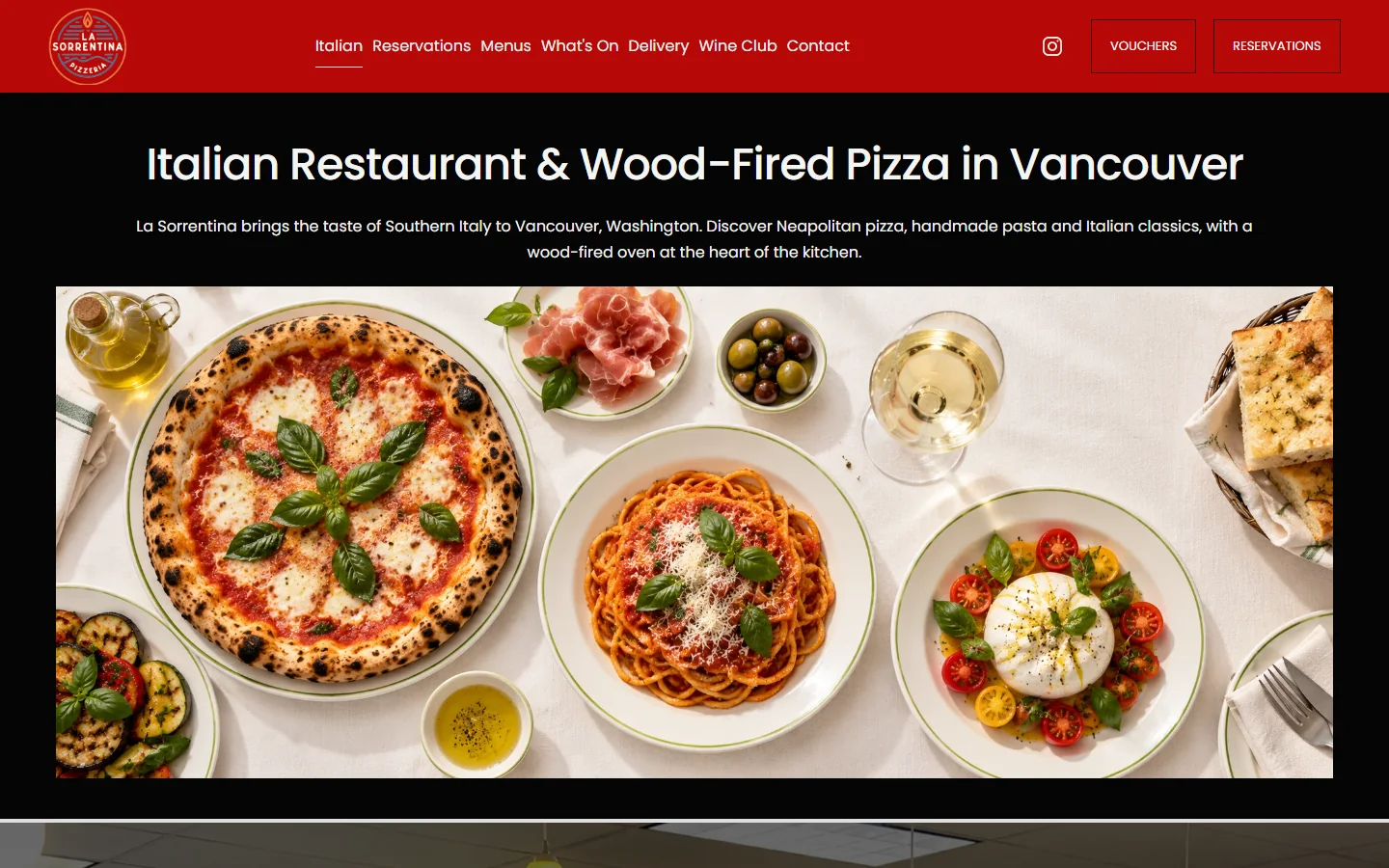
We built the site for La Sorrentina, a Southern-Italian restaurant and wood-fired pizzeria in Vancouver, WA, around exactly this list. Here it is, in the order guests use it.
1. A menu on the page, not in a PDF
The menu is the most visited page on nearly every restaurant site we have looked at, and a PDF is the worst way to serve it: slow on a phone, pinch-to-zoom, invisible to Google and to AI assistants answering “gluten-free pizza near me”. Put the menu on the page as text — sections, dish names, short descriptions, prices, dietary tags — and mark it up with Menu schema so search engines can read individual dishes. Keep a printable PDF as an extra if you like; never as the only version.
2. Hours that are never wrong
Hours in the header or footer of every page, holiday hours announced ahead of time, and a single source of truth that also updates your Google Business Profile. Wrong hours are the fastest way to earn a one-star review from someone standing at a locked door.
3. Location, parking, and how to get there
Address with a map link, parking notes (lot, street, garage validation), landmarks, and whether you take walk-ins. If you are inside a shopping center or on a busy corner, say which entrance.
4. Online ordering that does not leak commissions
Marketplace apps are useful for discovery, but every order through them costs 15–30% and the customer is theirs, not yours. Put direct ordering on your own site — Toast, Square Online, Clover or a commission-free platform — with pickup and delivery options, and make “Order direct” the biggest button on the page. Then remind marketplace customers, on the bag and the receipt, that ordering direct is cheaper for them and better for you.
5. Reservations embedded, not linked away
Whichever system you use — OpenTable, Resy, Tock, or the booking built into Toast or Square — embed the widget on your site so a guest picks a time without leaving. Show it on the home page, the menu page and the contact page. For walk-in-only spots, say so clearly and show typical wait times.
6. Photos of the food, the room and the people
Guests decide with their eyes. Real photos of signature dishes, the dining room at golden hour, the wood-fired oven, the team. A one-hour shoot with a local photographer is one of the highest-return dollars you will spend on the site — and the same photos feed your Google Business Profile and Instagram for months.
7. Pages for events, private dining and catering
These are your highest-ticket sales, and most restaurant sites bury them in a paragraph. Give each its own page: capacity, sample menus, minimums, a photo of the space set up, and a short inquiry form. “Private dining Vancouver WA” and “catering Camas” are searches with real intent and little competition.
8. Gift cards and specials with a real link
Gift cards sell in December and on Mother’s Day if the link is in the header; they do not sell at all if it is in the footer. Weekly specials, happy hour, seasonal menus — keep one page that is always current, and point to it from the home page.
9. Reviews with the answers
Pull recent Google reviews onto the site, and reply to every review on Google — the replies show up in search and tell the next guest you pay attention. A section like “What guests say about the pizza” on the menu page does more than a generic testimonials block.
10. Fast and mobile-first
Most restaurant visits come from a phone, often on the way over. Target under two seconds on cellular: compressed photos, no autoplaying background video on the menu page, no three chat widgets. A slow menu page loses the order to the marketplace app that is already installed.
11. Local SEO basics done properly
- Google Business Profile: correct categories, hours, a menu link to your own site (not to a marketplace), photos added weekly, questions answered.
- Same name, address, phone and hours on your site, Google, Yelp, TripAdvisor and the delivery apps.
- Restaurant and Menu schema on the site, one page per location if you have several, and a page per neighborhood you deliver to.
- Reviews: a simple way for guests to leave one — a QR code on the check works.
12. Ownership and a way to update it yourself
Menu prices change. Make sure your team can edit the menu, hours and specials without calling a developer, and that the domain, hosting and site files are in your name. Direct ordering, reservations and email lists all depend on a site you control.
The three-question test
Open your site on a phone and time yourself: how many seconds until you can see tonight’s menu with prices, confirm you are open right now, and start an order or book a table? If any of the three takes more than two taps, that is the first thing to fix.
How this looks in practice
La Sorrentina puts the menu, reservations, events, delivery links and gift cards one tap from the home screen, with the wood-fired oven and the dishes doing the selling. The structure is the same for a taqueria, a brunch spot or a three-location pizzeria; only the integrations change.
Rebuilding a restaurant site, or launching a new place? Tell us about it — you will get a page plan and a fixed quote after a 20-minute call.